SMART LOCATION BASED SCHEDULING
Pack Your Schedule With Nearby Customers Automatically
How It Works
Book smarter by matching customers with businesses already nearby saving time, miles, and unnecessary back-and-forth.
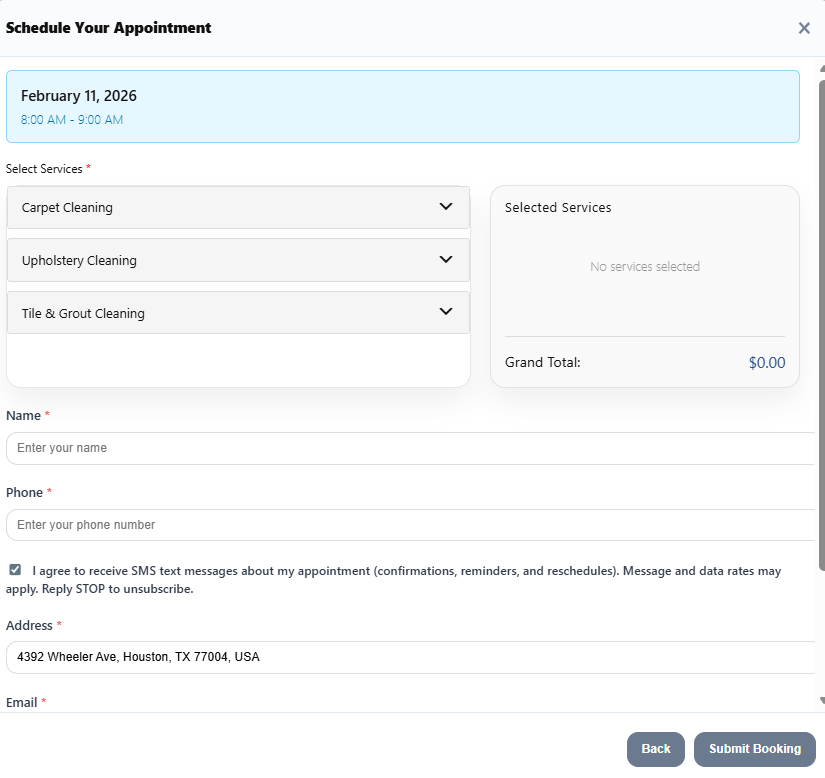
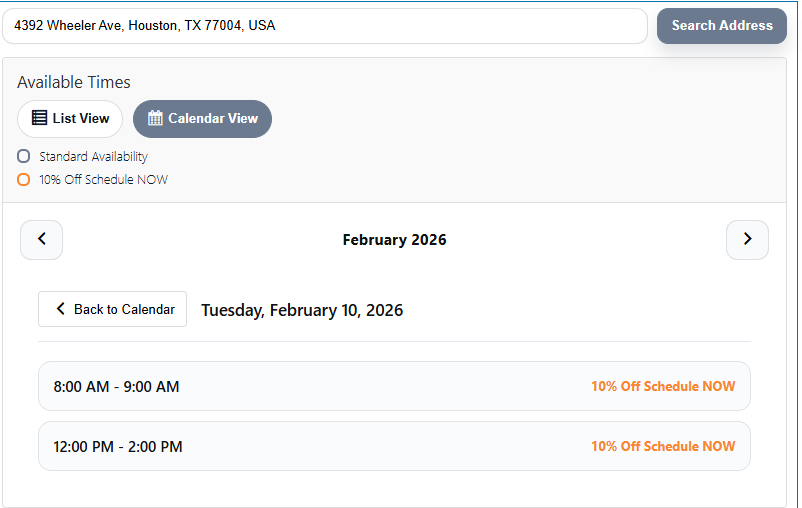
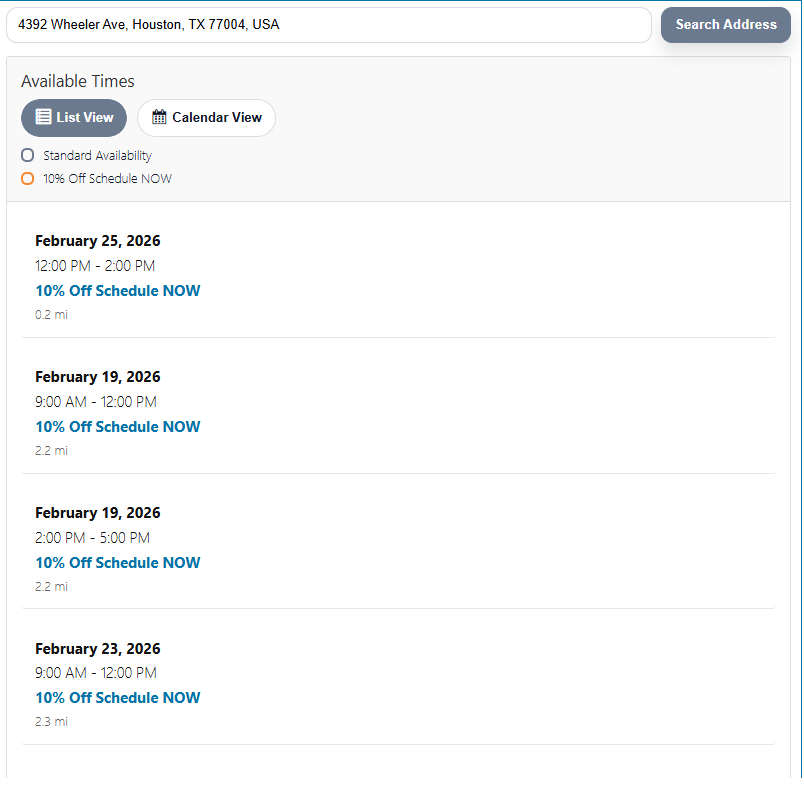
Step 1: Customer Enters Their Address
NearbyBooker instantly checks zones, radius rules, and calendars tied to that location.
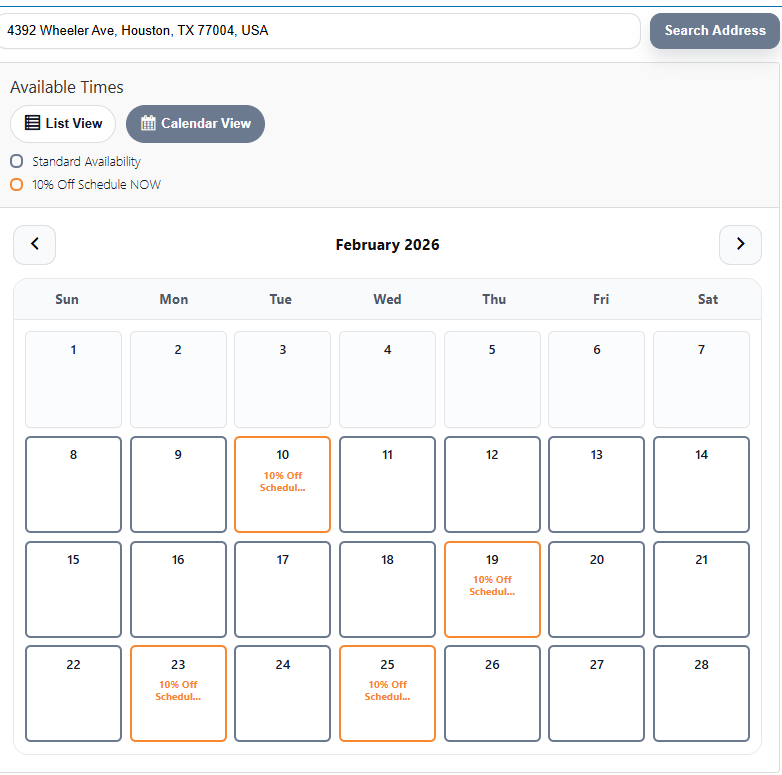
Step 2: Smart Dates Are Shown
Customers see: Standard available dates Highlighted offer dates (if they qualify) Clear incentives shown directly in the calendar
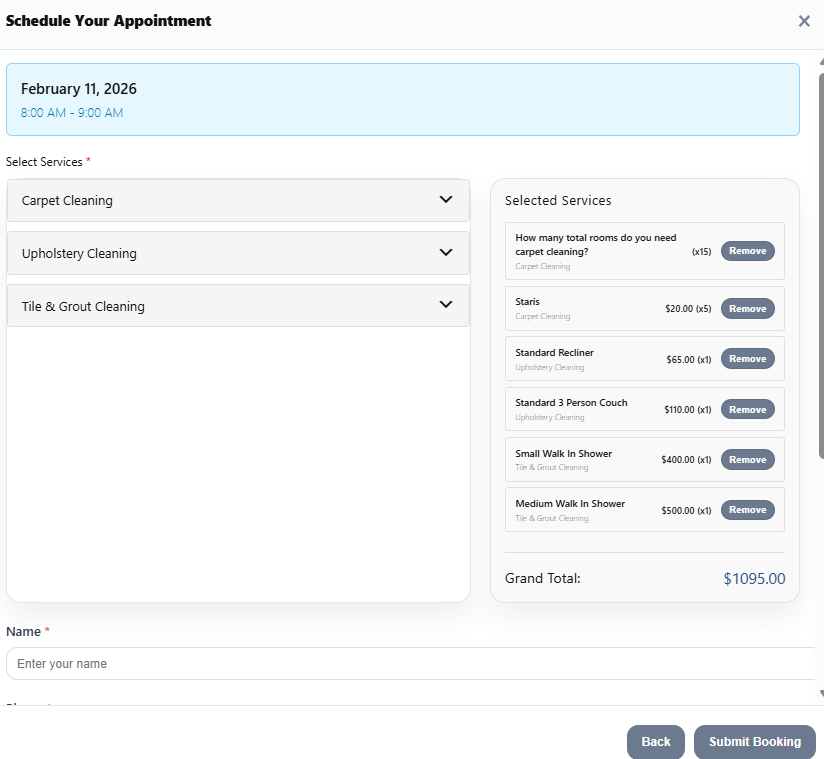
Step 3: Customer Picks Services & Time
Select services and quantities Pricing can be shown or hidden Instant quote if enabled
Step 4: Booking Is Submitted
Customer enters: Name Phone Email Address You decide if bookings are auto-approved or manual.
Step 5: Let The Automation Begin
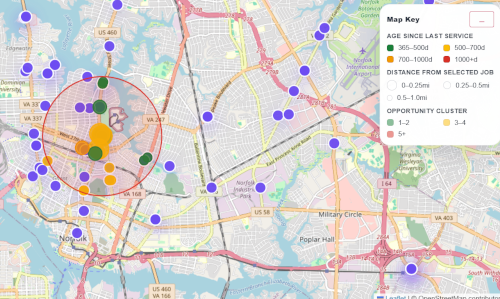
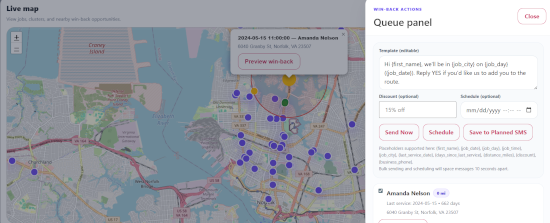
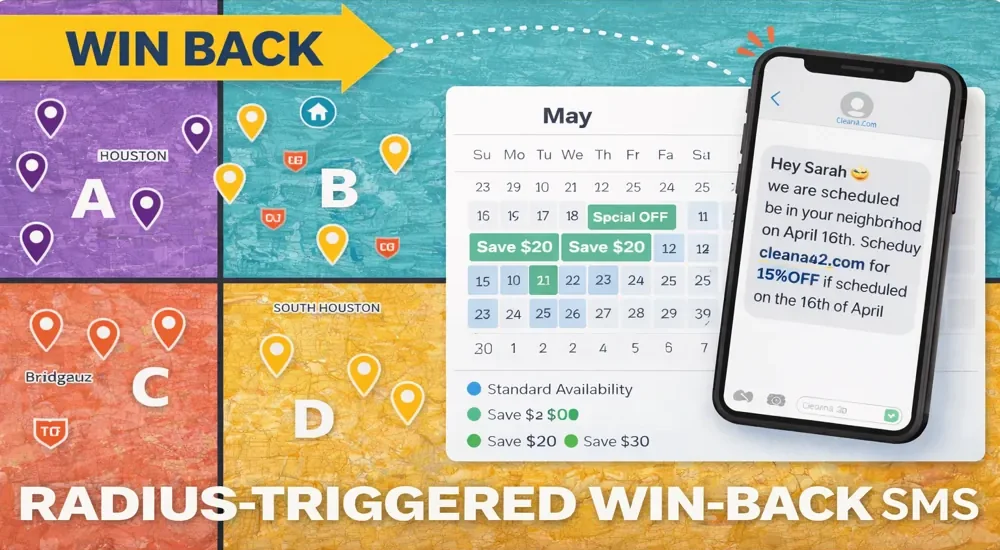
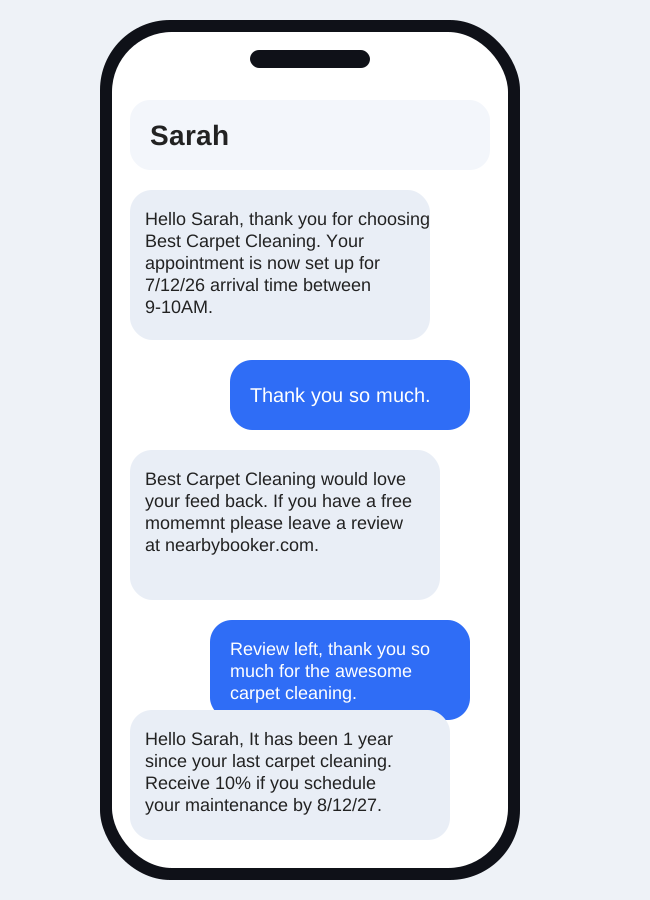
If your win back settings are a 1-mile radius and 365-day interval, here’s how it works: Billy had his carpets cleaned 380 days ago. Martha, who lives 0.5 miles from Billy, books an appointment for April 5th. Because Billy and any other past customers within 1 mile who haven’t been serviced in the last 365 days meet your criteria, they will automatically receive a win-back text message inviting them to book while you’re in their area.
AUTOMATION
🔹 Built-In SMS & Email Automation Every NearbyBooker account includes a dedicated SMS number. You can create up to 10 custom SMS templates, such as: Booking confirmations Appointment reminders Follow-ups after service Re-booking messages months later “Hey Mrs. Jones, it’s been 12 months since your last cleaning want to schedule again?” Email automation works the same way. Fully customizable.
Basic
FREE
- 1 Calendar Zone
- 40 Address Searches
- 20 SMS
- Win-Back Feature
- 1 SMS Number
- 10 Customizable SMS Templates.
- 10 Radius/Offer Options
- 2 Way SMS Reply
- Do Not Send SMS Hours
- Auto Delete SMS & Email Templates For Returned Customers
- Planned Email & SMS Screen
- 8 Radius/Zone Offers
- Manage Bookings Manager
- Google Cal Sync
- Google Contact Sync
- Approve Or Auto Approve Appointments Via SMS
- 5 Programable Dailey Timing Slots
- 8 Customizable Email Templates
- 10 Service Categories W/10 Items Per Category
- Zip Code Whitelist
- Look Ahead Days
- Minium Days For Schedule Availability
*You will be routed to geovee.io (sister domain)
Starter
$29
- 1 Calendar Zone
- 150 SMS Reminders
- Win-Back Feature
- 1 SMS Number
- 10 Customizable SMS Templates.
- 10 Radius/Offer Options
- 2 Way SMS Reply
- Do Not Send SMS Hours
- Auto Delete SMS & Email Templates For Returned Customers
- Planned Email & SMS Screen
- 8 Radius/Zone Offers
- Manage Bookings Manager
- Google Cal Sync
- Google Contact Sync
- Approve Or Auto Approve Appointments Via SMS
- 5 Programable Dailey Timing Slots
- 8 Customizable Email Templates
- 10 Service Categories W/10 Items Per Category
- Zip Code Whitelist
- Look Ahead Days
- Minium Days For Schedule Availability
*You will be routed to geovee.io (sister domain)
Professional
$59
- 4 Calendar Zone
- 300 SMS Reminders
- Win-Back Feature
- 1 SMS Number
- 10 Customizable SMS Templates.
- 10 Radius/Offer Options
- 2 Way SMS Reply
- Do Not Send SMS Hours
- Auto Delete SMS & Email Templates For Returned Customers
- Planned Email & SMS Screen
- 8 Radius/Zone Offers
- Manage Bookings Manager
- Google Cal Sync
- Google Contact Sync
- Approve Or Auto Approve Appointments Via SMS
- 5 Programable Dailey Timing Slots
- 8 Customizable Email Templates
- 10 Service Categories W/10 Items Per Category
- Zip Code Whitelist
- Look Ahead Days
- Minium Days For Schedule Availability
*You will be routed to geovee.io (sister domain)
Premium
$99
- 6 Calendar Zone
- 1 SMS Number
- 500 SMS Reminders
- Win-Back Feature
- 10 Customizable SMS Templates.
- 10 Radius/Offer Options
- 2 Way SMS Reply
- Do Not Send SMS Hours
- Auto Delete SMS & Email Templates For Returned Customers
- Planned Email & SMS Screen
- 8 Radius/Zone Offers
- Manage Bookings Manager
- Google Cal Sync
- Google Contact Sync
- Approve Or Auto Approve Appointments Via SMS
- 5 Programable Dailey Timing Slots
- 8 Customizable Email Templates
- 10 Service Categories W/10 Items Per Category
- Zip Code Whitelist
- Look Ahead Days
- Minium Days For Schedule Availability
*You will be routed to geovee.io (sister domain)
Offer-Driven Booking
You can create custom booking incentives tied to distance. Set up to 8 custom offers Each offer has a radius (miles) If a customer is within that radius, offer dates appear in a different color Custom offer text is shown directly in the calendar This fills gaps and nudges customers into dates that help you.
Standard Availability
Outside of offer zones, customers still see your standard availability.
Up to 5 time slots per day
Fully controlled on the backend
No overbooking
Clean fallback logic
What Our Customers Are Saying?
“Customers love how easy it is. They pick a time, get a confirmation, and show up ready. No calls, no confusion.”
Sarah L.
Operations Manager
“NearbyBooker completely changed how we book jobs. We’re no longer bouncing all over the map and our days are packed with nearby appointments.”
Mark R.
Owner, Mobile Cleanout
“This finally makes scheduling make sense. Less driving, more jobs per day, and way fewer no-shows.” David K.
David K.
Field Services Director

Location Based Scheduling Software Built for Service Businesses
Problem: NearbyBooker is location based scheduling software designed specifically for service businesses that operate in the field. Instead of booking appointments based only on open time slots, NearbyBooker schedules jobs based on where your business already is. By connecting directly to Google Calendar, NearbyBooker shows customers availability when your team will already be nearby. This reduces drive time, fills unused schedule gaps, and helps service businesses book more jobs without adding more hours.
Frequently Asked Questions
Any questions not answered below please email support@nearbybooker.com
Nearby Booker is a smart scheduling system built for service businesses. It connects to your Google Calendar and shows customers when you’ll already be in their area, helping you reduce drive time, fill open slots, and book smarter.
Customers enter their address, Nearby Booker checks your real availability from Google Calendar, applies your service area rules, and instantly shows the best booking options. Approved bookings are added directly to your calendar.
If your winback settings are a 2 mile radius and 180 day interval.
John last had his carpets cleaned 200 days ago. Sarah lives 1.2 miles from John and books an appointment for May 10th. Because John and any other past customers within 2 miles who have not been serviced in the last 180 days meet the criteria, they will automatically receive a winback text letting them know you will be in their neighborhood and inviting them to schedule.
Yes. Nearby Booker reads and writes directly to Google Calendar in real time. Any approved booking appears on your calendar automatically, and reschedules or cancellations update the event.
Yes. You control:
-available days and times
-buffer windows between jobs
-blackout dates
-Manual approval or auto-approval
-Nearby Booker follows your rules exactly.
Yes. Nearby Booker can send:
booking confirmations
approval or denial notices
reminders
reschedule and cancellation messages
You control what’s sent and when.
No. Messages are sent through a dedicated SMS number. Your personal phone number stays private unless you choose to share it.
Yes. You can enable or disable SMS and email notifications at any time from your Nearby Booker settings.
Nearby Booker enforces monthly SMS limits based on your plan. When you’re running low, you’ll receive a warning so you can upgrade before messages stop sending.
Yes. Nearby Booker supports multiple calendars, which are often used for multiple zones or crews. Each plan includes a set number of calendars, and you can upgrade if you need more.
Yes. All calendars share one core set of scheduling, service area, and notification rules. Calendars represent capacity, not different behaviors.
Nearby Booker can recommend which calendar fits a customer’s location based on your service zones. Advanced multi-calendar booking options are planned for future updates.
Yes, if you toggle the feature on. Customers can reschedule using a secure link. Changes update your calendar automatically.
Yes. Nearby Booker uses secure API keys and Google OAuth. Your data stays private and fully under your control.
Yes. Nearby Booker booking pages and admin tools are fully mobile-friendly.
-Carpet cleaners
-Plumbers
-HVAC companies
-Electricians
-Mobile repair services
-Any service business that travels to customers
No. Nearby Booker is designed to be easy to set up and manage without coding or technical experience.
Yes. You can upgrade at any time to add:
-More calendars
-Higher SMS limits
-Expanded usage caps
Nearby Booker works best for any local service base business
HVAC
Plumbers
Handyman
Lawn care
Start Booking Smarter Today
Reduce drive time, fill your schedule, and automate bookings based on location.
Copyright © 2026 NearByBooker by Geovee LLC. All Rights Reserved.