SMART LOCATION BASED SCHEDULING
AI Booking & Scheduling Built for Service Businesses
How It Works
Book smarter by matching customers with businesses already nearby saving time, miles, and unnecessary back-and-forth.
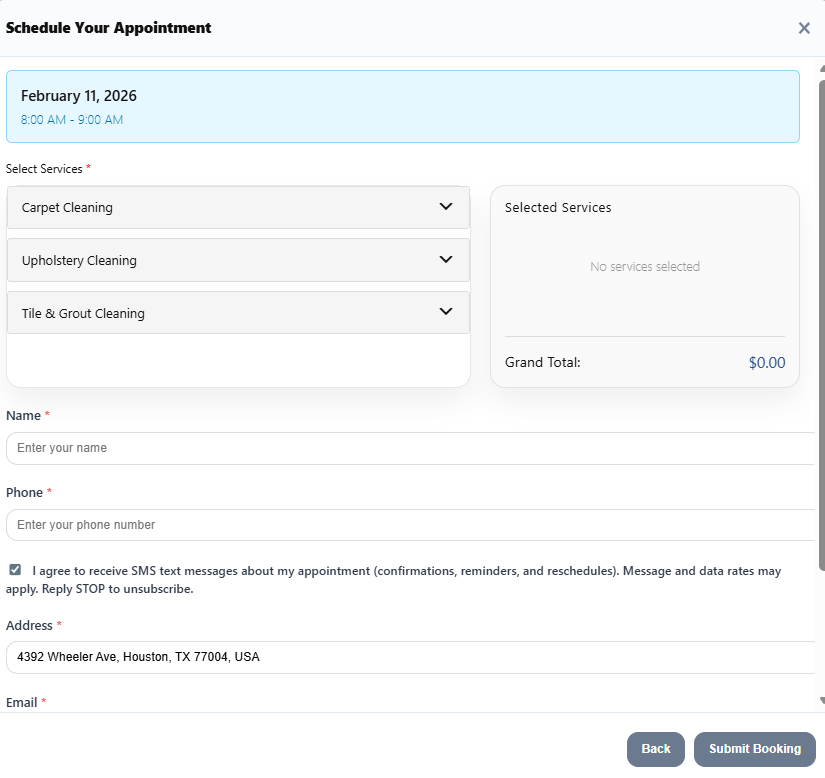
Step 1: Customer Enters Their Address
Nearby Booker validates the service address and pinpoints the customer’s actual location.
Step 2: Nearby Jobs Are Analyzed
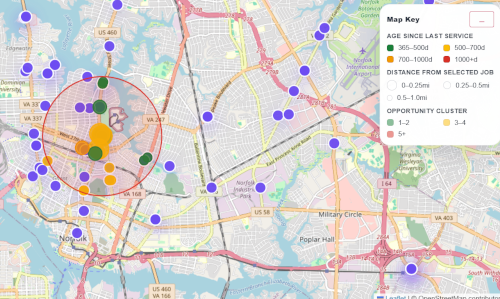
Nearby Booker compares the customer’s exact location with your existing scheduled jobs, calendars, zones, and radius rules.
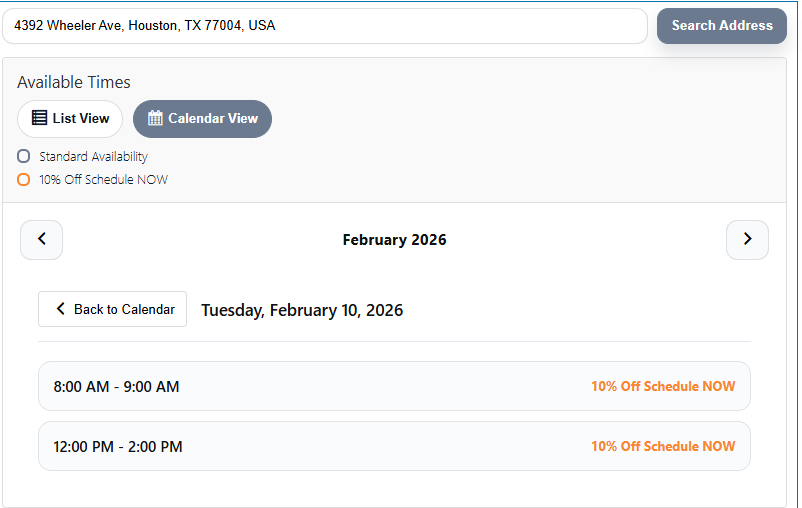
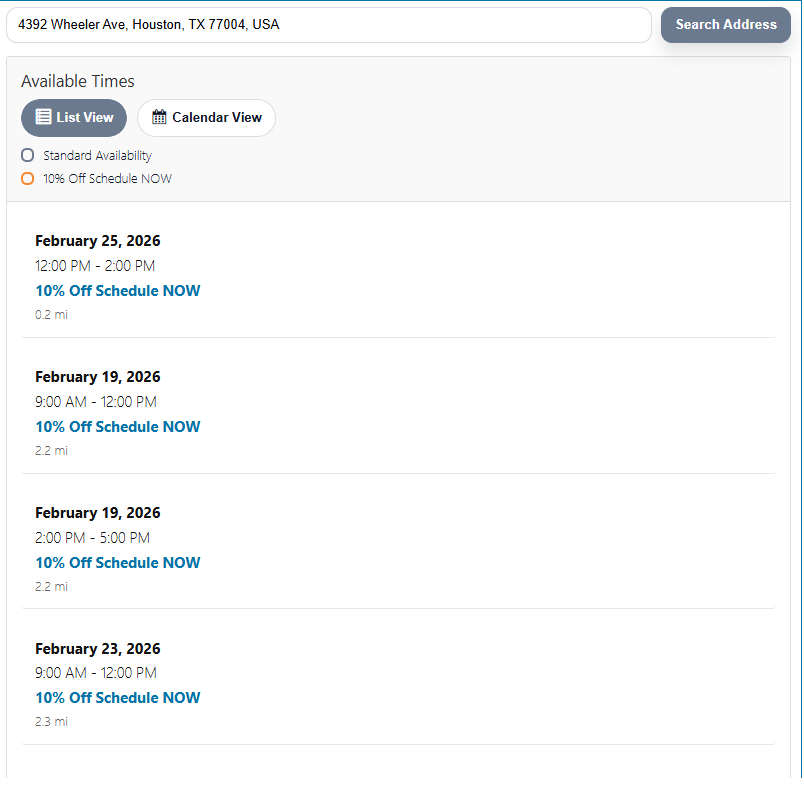
Step 3: Smart Dates & Offers Are Shown
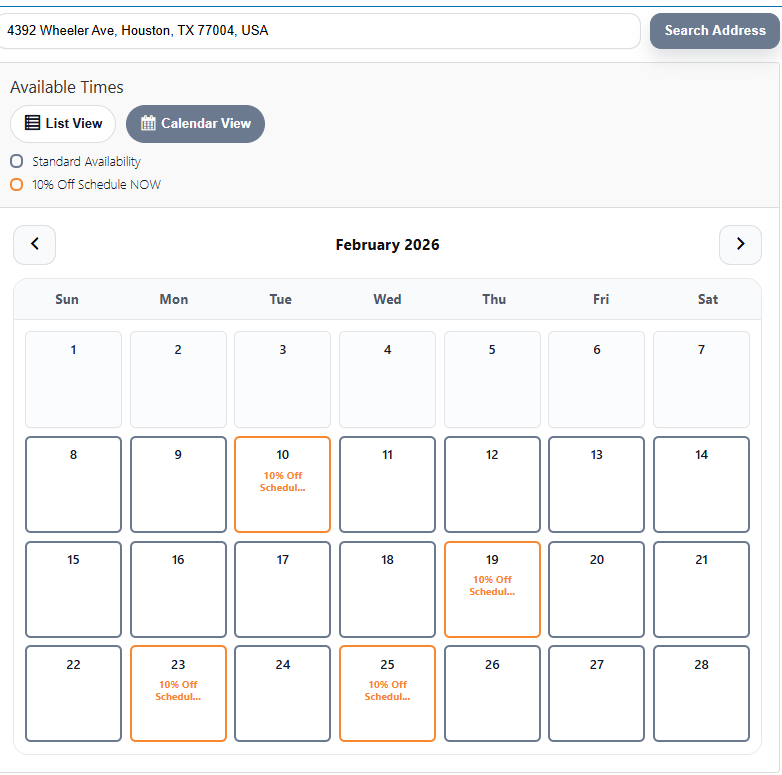
Customers see your normal availability plus highlighted dates when you’re already nearby. You can automatically attach savings offers to encourage better-fitting appointments.
Step 4: Customer Builds Their Appointment
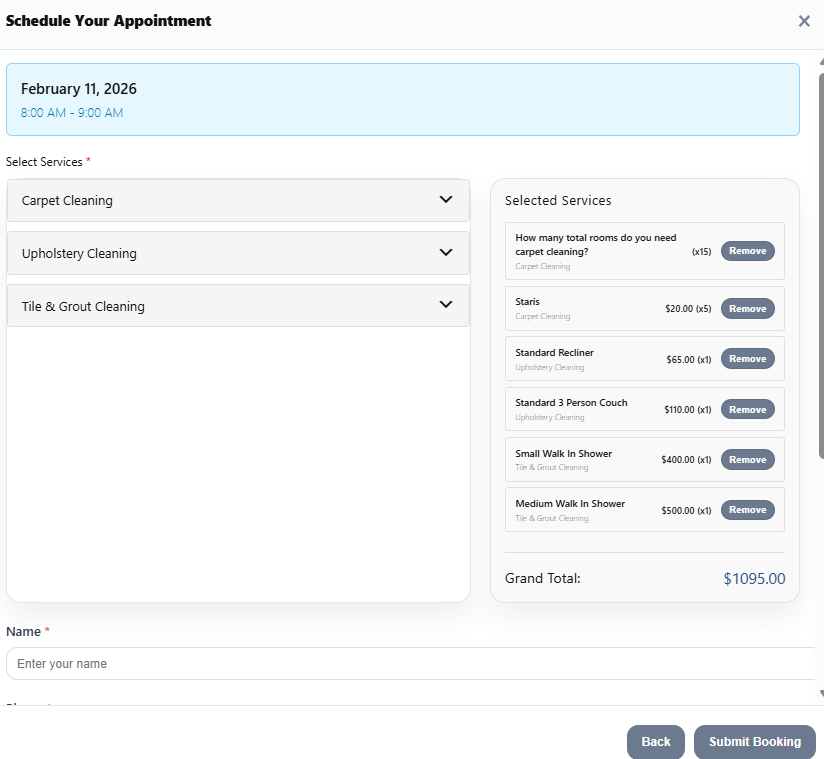
Customers choose services, quantities, and an available time. Pricing and instant estimates can be shown when enabled.
Step 5: Nearby Booker Keeps Filling Your Schedule
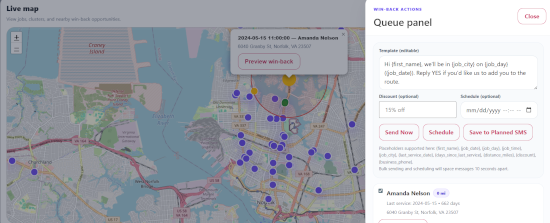
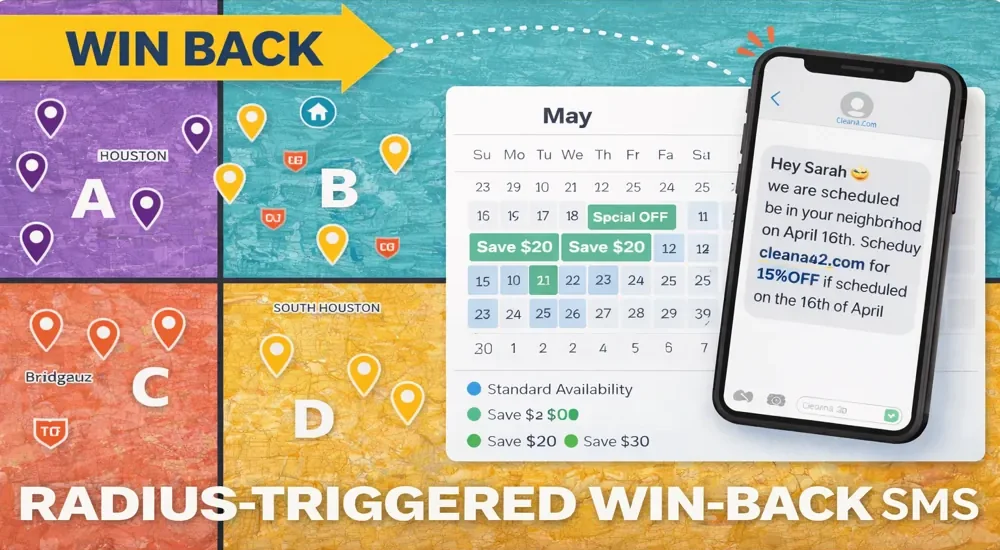
Every new booking can create another opportunity. Nearby Booker can automatically identify past customers located near an upcoming job and send them a win-back message based on your radius and customer-history rules. The result: more jobs packed into the same area, fewer unnecessary miles, and less dead time between appointments. Example: Martha books a job for April 5. Billy, a past customer only 0.5 miles away who hasn’t booked in over a year, matches your win-back rules. Nearby Booker can automatically invite Billy to schedule while you’re already in his neighborhood.
AUTOMATION
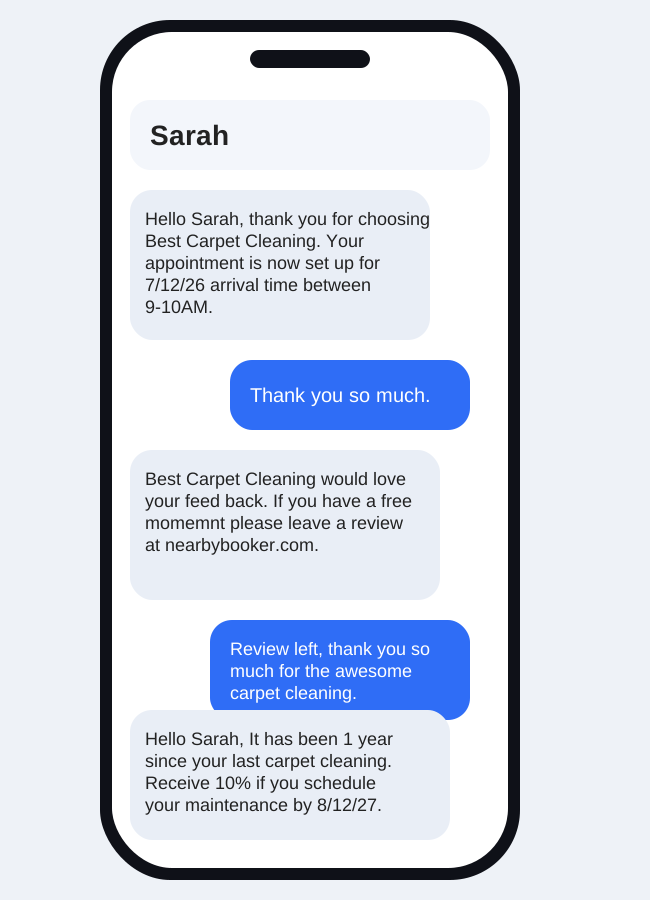
🔹 Built-In SMS & Email Automation Every Nearby Booker account includes automated SMS and email tools designed for service businesses. Send booking confirmations, appointment reminders, follow-ups, review requests, rebooking messages, and custom customer communications automatically. Create your own templates and control when each message is sent. Nearby Booker can also use customer history and exact location to help bring past customers back when you're already working nearby.
VOICE AI THAT ACTUALLY UNDERSTANDS THE JOB
Nearby Booker Voice AI does more than answer the phone. It understands your actual services, categories, secondary services, quantities, pricing rules, and booking setup. Customers can describe what they need naturally, ask questions, compare service options, add multiple services, and schedule without the conversation being reduced to a generic lead form.
Customer:
“I need about 1,200 sq. ft. of carpet cleaned, and it smells like urine.”
Nearby Booker:
Identifies carpet cleaning, captures the 1,200 sq. ft. quantity, recognizes the urine issue, and can offer the appropriate secondary treatments—such as liquid or foam enzyme—then explain the difference when the customer asks.
The AI doesn’t just hear “carpet cleaning” and ask for an address. It continues discovering what the customer actually needs.
Then Nearby Booker uses the customer’s exact location and your existing scheduled jobs to offer appointment times that make geographic sense.
BASIC
- 1 Calendar Zone
- 40 Address Searches
- 20 SMS
- Win-Back Feature
- 1 SMS Number
- 10 Customizable SMS Templates
- 10 Radius/Offer Options
- 2 Way SMS Reply
- Do Not Send SMS Hours
- Auto Delete SMS & Email Templates For Returned Customers
- Planned Email & SMS Screen
- 8 Radius/Zone Offers
- Manage Bookings Manager
- Google Cal Sync
- Google Contact Sync
- Approve Or Auto Approve Appointments Via SMS
- 5 Programable Dailey Timing Slots
- 8 Customizable Email Templates
- 10 Service Categories
- W/10 Items Per Category
- Zip Code Whitelist
- Look Ahead Days
- Minium Days For Schedule Availability
STARTER
- 1 Calendar Zone
- 150 SMS Reminders
- Win-Back Feature
- 1 SMS Number
- 10 Customizable SMS Templates
- 10 Radius/Offer Options
- 2 Way SMS Reply
- Do Not Send SMS Hours
- Auto Delete SMS & Email Templates For Returned Customers
- Planned Email & SMS Screen
- 8 Radius/Zone Offers
- Manage Bookings Manager
- Google Cal Sync
- Google Contact Sync
- Approve Or Auto Approve Appointments Via SMS
- 5 Programable Dailey Timing Slots
- 8 Customizable Email Templates
- 10 Service Categories
- W/10 Items Per Category
- Zip Code Whitelist
- Look Ahead Days
- Minium Days For Schedule Availability
PROFESSIONAL
- 4 Calendar Zone
- 300 SMS Reminders
- Win-Back Feature
- 1 SMS Number
- 10 Customizable SMS Templates
- 10 Radius/Offer Options
- 2 Way SMS Reply
- Do Not Send SMS Hours
- Auto Delete SMS & Email Templates For Returned Customers
- Planned Email & SMS Screen
- 8 Radius/Zone Offers
- Manage Bookings Manager
- Google Cal Sync
- Google Contact Sync
- Approve Or Auto Approve Appointments Via SMS
- 5 Programable Dailey Timing Slots
- 8 Customizable Email Templates
- 10 Service Categories
- W/10 Items Per Category
- Zip Code Whitelist
- Look Ahead Days
- Minium Days For Schedule Availability
PREMIUM
- 5 Calendar Zone
- 1 SMS Number
- 500 SMS Reminders
- Win-Back Feature
- 10 Customizable SMS Templates
- 10 Radius/Offer Options
- 2 Way SMS Reply
- Do Not Send SMS Hours
- Auto Delete SMS & Email Templates For Returned Customers
- Planned Email & SMS Screen
- 8 Radius/Zone Offers
- Manage Bookings Manager
- Google Cal Sync
- Google Contact Sync
- Approve Or Auto Approve Appointments Via SMS
- 5 Programable Dailey Timing Slots
- 8 Customizable Email Templates
- 10 Service Categories
- W/10 Items Per Category
- Zip Code Whitelist
- Look Ahead Days
- Minium Days For Schedule Availability
PINPOINT LOCATION BASED BOOKING
Nearby Booker uses the customer’s actual location and your existing scheduled jobs to identify dates that make geographic sense—not just ZIP codes or broad service areas.
Create custom radius-based booking incentives that automatically appear when a customer is close to an existing job. Nearby Booker can highlight those dates directly in the booking calendar and show a custom savings message to encourage customers to choose the time that helps you build a tighter route.
SMART AVAILABILITY
Customers still see your normal availability when no nearby-job offer applies.
- Up to 5 appointment windows per day
- Availability controlled by your business rules
- Nearby dates can be automatically highlighted
- Radius-based savings can appear directly in the calendar
- Standard availability remains available outside the radius
- Designed to help reduce unnecessary drive time and fill schedule gaps
What Our Customers Are Saying?
“Customers love how easy it is. They pick a time, get a confirmation, and show up ready. No calls, no confusion.”
Sarah L.
Operations Manager
“NearbyBooker completely changed how we book jobs. We’re no longer bouncing all over the map and our days are packed with nearby appointments.”
Mark R.
Owner, Mobile Cleanout
“This finally makes scheduling make sense. Less driving, more jobs per day, and way fewer no-shows.” David K.
David K.
Field Services Director
Location Based Scheduling Software Built for Service Businesses
Problem: NearbyBooker is location based scheduling software designed specifically for service businesses that operate in the field. Instead of booking appointments based only on open time slots, NearbyBooker schedules jobs based on where your business already is. By connecting directly to Google Calendar, NearbyBooker shows customers availability when your team will already be nearby. This reduces drive time, fills unused schedule gaps, and helps service businesses book more jobs without adding more hours.
Nearby Booker is a smart scheduling system built for service businesses. It connects to your Google Calendar and shows customers when you’ll already be in their area, helping you reduce drive time, fill open slots, and book smarter.
Customers enter their address, Nearby Booker checks your real availability from Google Calendar, applies your service area rules, and instantly shows the best booking options. Approved bookings are added directly to your calendar.
If your winback settings are a 2 mile radius and 180 day interval.
John last had his carpets cleaned 200 days ago. Sarah lives 1.2 miles from John and books an appointment for May 10th. Because John and any other past customers within 2 miles who have not been serviced in the last 180 days meet the criteria, they will automatically receive a winback text letting them know you will be in their neighborhood and inviting them to schedule.
Yes. Nearby Booker reads and writes directly to Google Calendar in real time. Any approved booking appears on your calendar automatically, and reschedules or cancellations update the event.
Yes. You control:
-available days and times
-buffer windows between jobs
-blackout dates
-Manual approval or auto-approval
-Nearby Booker follows your rules exactly.
Yes. Nearby Booker can send:
booking confirmations
approval or denial notices
reminders
reschedule and cancellation messages
You control what’s sent and when.
No. Messages are sent through a dedicated SMS number. Your personal phone number stays private unless you choose to share it.
Yes. You can enable or disable SMS and email notifications at any time from your Nearby Booker settings.
Nearby Booker enforces monthly SMS limits based on your plan. When you’re running low, you’ll receive a warning so you can upgrade before messages stop sending.
Yes. Nearby Booker supports multiple calendars, which are often used for multiple zones or crews. Each plan includes a set number of calendars, and you can upgrade if you need more.
Yes. All calendars share one core set of scheduling, service area, and notification rules. Calendars represent capacity, not different behaviors.
Nearby Booker can recommend which calendar fits a customer’s location based on your service zones. Advanced multi-calendar booking options are planned for future updates.
Yes, if you toggle the feature on. Customers can reschedule using a secure link. Changes update your calendar automatically.
Yes. Nearby Booker uses secure API keys and Google OAuth. Your data stays private and fully under your control.
Yes. Nearby Booker booking pages and admin tools are fully mobile-friendly.
-Carpet cleaners
-Plumbers
-HVAC companies
-Electricians
-Mobile repair services
-Any service business that travels to customers
No. Nearby Booker is designed to be easy to set up and manage without coding or technical experience.
Yes. You can upgrade at any time to add:
-More calendars
-Higher SMS limits
-Expanded usage caps
Nearby Booker works best for any local service base business
HVAC
Plumbers
Handyman
Lawn care
Service Business Scheduling Tips

How to Plan Booking Availability Around Days Off
A landscaping owner plans to close on Friday so the crew can attend training. The website still accepts appointments, and a customer books a garden cleanup for that morning. Now the owner has to explain why an available appointment was never really available. Booking availability should reflect the days your

Customer Rescheduling in Nearby Booker: When to Enable It
A homeowner books a plumber for a faucet replacement, then learns they must be away that morning. Another customer wants an electrician to arrive after a delivery instead of before it. Neither customer necessarily wants to cancel the job. They need a clear way to move it. Customer rescheduling gives

How Nearby Booker Brings Past Customers Back When You Are Nearby
A lawn care company books a seasonal cleanup on a street where it has worked before. Several past customers live nearby, but none has asked for another visit yet. The useful question is not simply who is on the contact list. It is who might reasonably need the service again,

Manual Booking Approval or Automatic Approval?
A mobile detailer receives a request for a familiar maintenance package. A repair company receives a request that says only, “The machine stopped working.” Both customers want an appointment, but the business has very different information to work with. Manual booking approval gives an owner a review step before accepting

How to Set Appointment Buffers for a Service Business
A carpet cleaning job ends at noon. The next customer is booked for noon, too. Even if the first job finishes exactly as planned, the technician still needs to pack equipment, reach the next address, park and get ready. The calendar looks full, but the schedule cannot work as written.

What Your Online Booking Form Should Ask Before Scheduling a Service Job
A name, phone number, and preferred time can tell you who wants an appointment. They may not tell you enough to schedule the work. For a business that travels to customers, a useful online booking form needs to establish the job and its location before an appointment becomes a commitment.
Start Booking Smarter Today
Reduce drive time, fill your schedule, and automate bookings based on location.
Copyright © 2026 NearByBooker by Geovee LLC. All Rights Reserved.